• We are a multilingual website again. Read the notice about this.
  • Understand AI use at MyPTSD: all AI use is explained in our AI help page. AI use is by choice here. It exists if you want it, but does nothing unless you choose to use it.

Need Computer Help -- Windows Installer Driving Me Nuts!

  • Post starter Post starter p-no
  • Start date Start date
Status
Not open for further replies.
P

p-no

Hi,

I was hoping someone could help me with a problem with Windows Installer. I have an Asus Eee PC with Windows XP. Here's the info on my system:
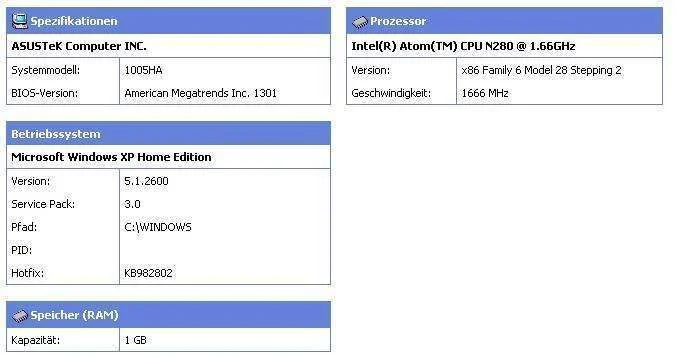
Eee PC.webp


The problem is I can not install software, software updates, whatever anymore because the Windows Installer does not respond. Most of the software I would like to install or update requires Windows Installer.

I have searched the web for info on this very problem and it seems the only thing one can do is format the hard drive and reinstall Windows XP or another operating system.

Do you by any chance have an idea of what else I could try or confirm that formatting the hard drive and reinstalling XP or another operating system is the only way to go? Any comments that could be of help? I have no money to buy another operating system and no XP. I am aware that XP will not survive much longer, but my wallet has clearly stated no spending money on an operating system if there isn't anything else to try first.

Thanks!
 
Hi, I have a similar problem, only I'm running Windows 7. I called Lenovo (my laptop is a Lenovo) and they told me I have to reinstall Windows 7 and they sent me the discs. I was getting that error along with another that required me to download a program (which I can't) so I am in a dead end loop.
 
Realistically it should be fixable, but it's very difficult to do without a) trying lots of things and b) without having the computer to hand, so I can only make some suggestion - plus I am no expert, I just usually manage to fix issues such as these and have done for several neighbours and relatives also. Have you tried running a registry cleaner (I'd reccomend CCleaner as I've always found it free, safe and reliable) and make sure that as few programs are running as possible?

Solara: If you have the discs (or a backup partition) you should be able to reinstall your operating system without downloading anything and if you haven't you can always install a Linux OS on a partition (or from a pen-drive) but unless you plan on making that move permanent, there is little point. Out of curiosity do you know the name of what it was you were told to download?
 
Last edited:
@p-no Have you re-run windows update or checked/view installed updates? It should show items it has attempted to install even if unsuccessful.

Due to intro of Win8 they are really causing havoc. I would also recommend going to the manufacturers web site and search your model which then should have a section for specific current update issues.

Do be careful as there are a ton of sites who claim they are Microsoft authorized. CNET download is a reliable place for most drivers. :) Hugs, Whitney
 
@Whitneys story

Thanks, Whitney! I have done what you're suggesting (if I understand correctly), but I can not install anything, as Solara said. No updates, no drivers, no nothing, because they all require the Windows Installer! :wideeyed:

Sometimes I wonder if the Board of Directors at Windows like having a big laugh at me. :eek: :D They allow this bug that has Windows Installer "die", but you need Windows Installer to install their fixes, updates, and software to help you to "revive" your Windows Installer... :banghead: :banghead: :banghead:
 
Yes this is what they do! So we will give up and buy new..grrrrr.

I will look around from computer, am on phone . Have you ever done the *** "Create a recovery disk"? Your system has a partition with the original operating system. Might take about 6 Blank CD's. Or it can be put on a external storage.

***I would recommend doing this before formatting or doing any fixes, in case that is the only resolve. Formatting will erase everything. All data and programs.

I would try this first, before format. "System Restore" which will go back to a previous time before the glitch started. You pick the date the system has a pop up showing which restore points are recorded. Find one from before the trouble began. This will not restore any programs you installed since that date, but will keep the data.

Your system is from the time that XP rarely came with a disk. The operating system is on a small partition showing as a seperate drive letter.

A new trick they are doing is files that are downloaded come in blocked. Right click on properties, if you can locate the new windows installer; at the bottom it will say it has come from outside/blocked. Check the unblock and apply. Look in your downloaded file folder. The file should have an .msi extension. But I will confirm in a few hours.

It might take a couple hours creating the system disk :). It will walk you through all stages from labelling each disk to completion. :hug: Whitney
 
I have searched the Asus and Microsoft sites for a fix. Nothing! If you have a good security program it might be worth going to Asus
Support, they have a scan they will do for free to search for your missing or problem situations. Microsoft.com has the same option
go to XP section and down the page is a search section. There are some outside sources but I advise caution as they say free download.....but to use you have to pay 29.99 usually:eek: creeps. Still thinking...Hugs Whitney
 
Status
Not open for further replies.

Donation drives

2026 Donation Goal

Goal
$1,800.00
Earned
$910.00
This donation drive ends in
0 hours, 0 minutes, 0 seconds
  50.6%

Trending content

Featured content

Back
Top Bottom